Capture instantly
Press the hotkey, drag a region, and confirm. Your screenshot is copied and saved in one step.
A small Windows utility
Capture a region, pin it to your desktop, and keep working. Mouse4 gives you the useful parts of a screenshot tool without the extra clutter.

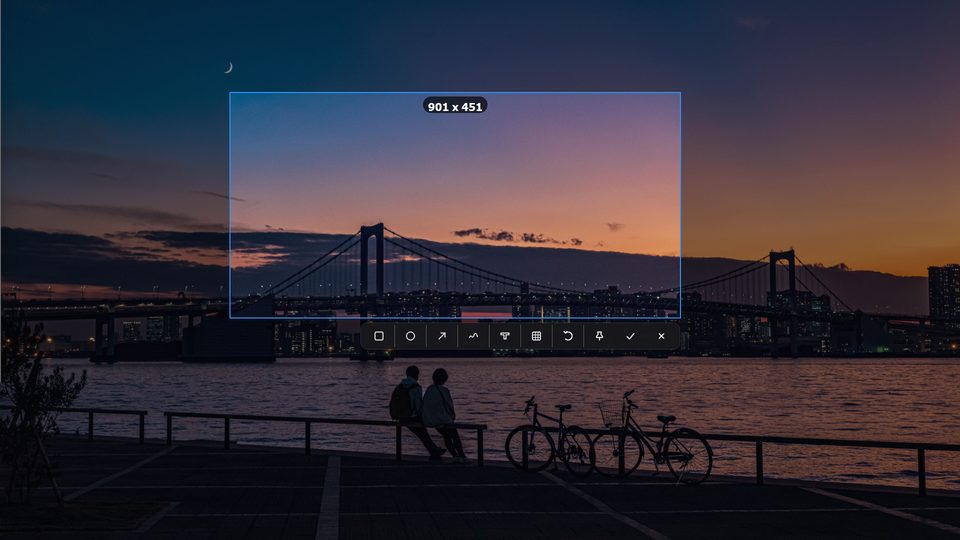
 Ready to capture
Drag a region
Pinned to your desktop
Ready to capture
Drag a region
Pinned to your desktop
The useful parts
Press the hotkey, drag a region, and confirm. Your screenshot is copied and saved in one step.
Keep an important screenshot visible while you work. Move it, zoom it, or close it when you are done.
Every capture is copied to the clipboard and saved as a timestamped local PNG in one step.
Double-click empty space in File Explorer to return to the previous folder without reaching for the Back button.
How it works
Bring Mouse4 up whenever you need it.
Select exactly what matters. Nothing more.
Use the capture immediately, find it later, or keep it floating above your desktop.
Simple, honest pricing
Use every feature for 14 days. When you are ready, pay once and keep Mouse4 for the life of the product.
One-time payment · No recurring charges
Questions, answered
Click Download free trial to download the latest Windows Setup installer directly. Release notes are available separately.
No. Mouse4 is a one-time lifetime purchase with no recurring charges.
One license can be activated on up to three computers.
Stripe or PayPal collects your checkout email. After payment is confirmed, the key is generated and sent to that email address.
No. Captures are processed and saved locally by the Windows app.
Yes. Use Pin to desktop to keep a capture above other windows while you work.